🍽 Built for Independent Restaurants

Stop Losing Money You Can't See

Know the exact profit on every dish. Catch over-portioning, waste, and theft — automatically. All inside a simple Google Sheet you run in 20 minutes a week.

Get It Now — €99

One-time payment · No subscription · 6 months free updates

See real food cost per dish — instantly
Spot missing stock, waste, and theft weekly
No software to install — just Google Sheets
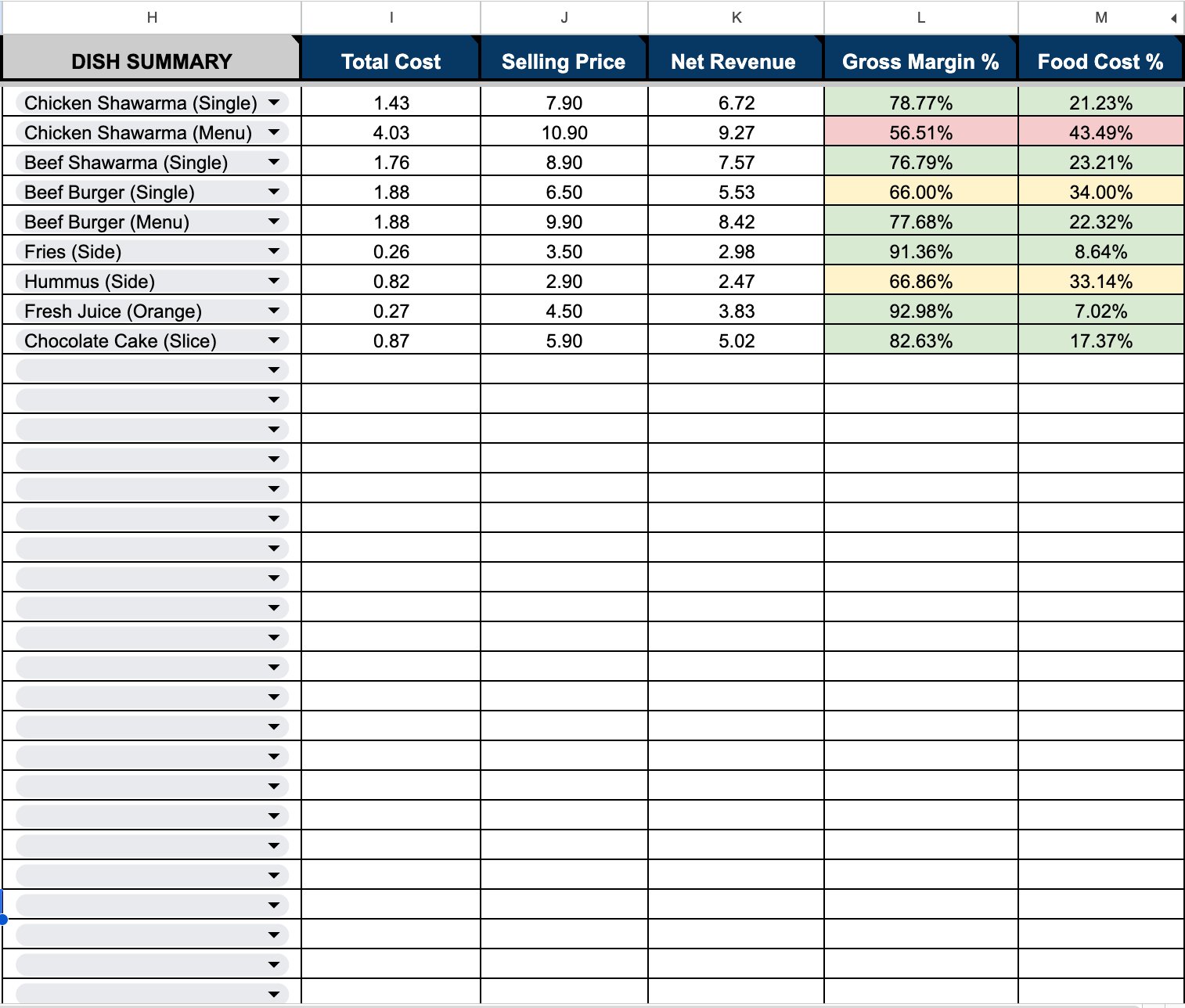
WorkFly Profit Summary

+ Four More Powerful Tabs Inside

The Problem

Most Restaurants Guess Their Profit

You work 14-hour days, serve hundreds of plates, and at the end of the month — you're not sure where the money went.

📉

Invisible Food Cost

You set menu prices based on gut feeling. Your best-seller might actually be your least profitable dish — and you'd never know.

🗑️

Waste You Can't See

Over-portioning, spoilage, and theft drain your margins every week. Without a system, this money disappears silently.

💸

No Time for Spreadsheets

You know you should track costs. But building a system from scratch takes weeks — so it never gets done.

Is This For You?

This Is For You If...

You run an independent restaurant and don't know your real food cost on each dish
You suspect waste or theft but have no way to prove it — or measure how much it's costing you
You've tried tracking costs before but gave up because it was too complicated or too time-consuming
You want the same food cost control that big chains use — without paying €200–500/month for restaurant software
The Solution

A System That Does the Math For You

The WorkFly Restaurant Profit Optimizer is a complete food cost tracking system inside Google Sheets. No software to install. No monthly fees.

Instant Profit Visibility

See the exact cost and margin of every dish — automatically calculated, color-coded green, yellow, or red.

🔍

Catch Waste & Theft

Compare what you should have used vs what actually disappeared. The system flags problems automatically.

📱

Count Stock on Your Phone

Do your weekly inventory count from the Google Sheets app. Walk through your kitchen, tap and type — 20 minutes.

Restaurant management software charges €200–500/month. This does the same food cost tracking for a one-time €99 — inside a tool you already use.
How It Works

Three Steps to Control Your Food Cost

1

Setup Your Menu

Enter your dishes, ingredients, and prices. Build each recipe ingredient by ingredient. One-time setup — 30 to 40 minutes.

2

Count Weekly

Every week, count your stock on your phone. Log deliveries as they arrive. Enter how many dishes you sold.

3

See Your Results

The system shows your real margins, flags waste, and tells you exactly which ingredients are disappearing.

What's Inside

5 Tabs That Run Your Kitchen Numbers

Setup & Lists

Menu items, prices, and tax deductions. Set once, forget.

Ingredient Master

Every ingredient with pack size and price. Cost per gram auto-calculated.

Profit Builder

Build recipes, see total cost, margin, and food cost % — color-coded.

Inventory Count

Weekly stock count. Start, purchases, end count. Mobile-friendly.

Sales & Variance

Theoretical vs actual. Flags waste, theft, over-portioning.

See It In Action

Watch the Full Walkthrough

See how a real restaurant menu is set up and tracked in under 10 minutes

Everything You Get

Complete System.
One Price.

No upsells. No hidden tiers. Everything you need to track food cost and maximize profit.

  • 5-Tab Google Sheets Profit Optimizer
  • Step-by-Step Implementation Guide (PDF)
  • Full Video Tutorial with Screen Recording
  • 6 Months of Free Updates
  • 3 Free Customization Requests
  • Email Support — 24–48 Hour Response
  • Works on Desktop, Tablet, and Mobile
Simple Pricing

One Payment. Yours Forever.

€99 one-time
No subscription. No monthly fees. Ever.
  • Complete 5-tab profit tracking system
  • Implementation guide + video tutorial
  • 6 months free updates
  • 3 free customization requests
  • Works globally — any currency
Get It Now — €99

Instant delivery to your Google Drive

🔒 Not what you expected? Email us within 14 days for a full refund.

Common Questions

Frequently Asked Questions

Do I need to install any software?
No. Everything runs inside Google Sheets, which is free. Use it on your laptop, tablet, or phone — browser or app.
How long does the initial setup take?
About 30 to 40 minutes to enter your menu, ingredients, and recipes. After that, the weekly routine takes less than 20 minutes.
Can I use my own currency?
Yes. The sheet uses plain numbers with no currency symbols. Enter prices in whatever currency you use — euros, dollars, pounds, riyals.
Why not just use a free food cost template?
Free templates give you a blank spreadsheet with no logic. This system auto-calculates cost per gram, links recipes to inventory, flags waste automatically, and gives you a weekly variance report. Building this yourself would take weeks.
What if I have more than 50 menu items?
The sheet supports up to 500 rows per tab. If you need more, contact us — we'll extend it as one of your free customization requests.
Can I use this for multiple locations?
Yes. Make a separate copy of the file for each location. Each runs independently in its own Google Drive.
What are the 3 free customization requests?
Need to adjust margin thresholds, add a category, or change a layout? Email us with "Customization Request" in the subject — up to 3 per customer, free.

Need Help?

Questions about the product, setup, or your customization requests — we're here for you.

support@theworkfly.com

We respond within 24–48 hours

Stop Guessing.
Start Knowing.

Every week without tracking costs you money you'll never get back. Set up in one afternoon. See your real numbers by tonight.

Get The WorkFly Optimizer — €99